
Real Estate Brokers & Teams • Property Managers • Service Businesses
Your Fully Managed Back-Office Team, Running on Systems You Own.
We Document Your Processes Once, Then Our Trained Team Handles Your Busywork Forever.
Admin Advantage is a done-for-you back-office operation, combining documented Standard Operating Procedures with fully managed Virtual Assistants to integrate, delegate, and automate your repetitive admin work.
You explain each task once, then we handle the rest. Where possible, we even automate portions of your Workflows over time and pass those savings on to you.
Hire REVAS to free you and your team from repetitive Below Pay-Grade tasks, once and for all.

"Owners can always tell me who does the work. Almost none of them can tell me how it gets done, because the how was never written down. It lives in somebody's head, and the day that somebody leaves, it walks out the door with them. So we built REVAS on one principle: Process-Based, Not People-Based. Document the how one time, and it belongs to your business instead of to a person. That single idea is behind everything you're about to read on this page."
- Ali Murtaza, REVAS CEO
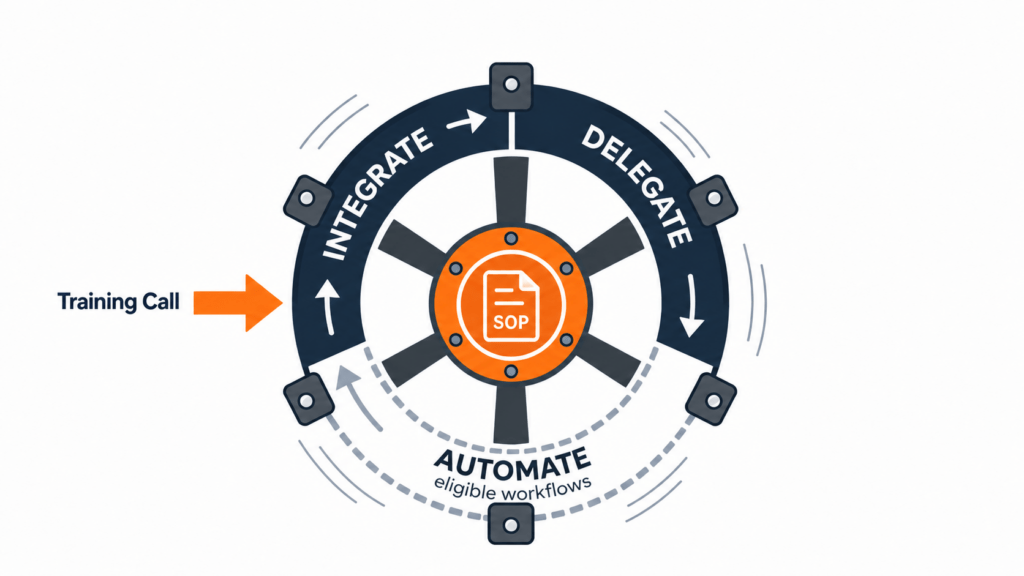
Every Workflow you offload starts the same way: one Over-the-Shoulder Training Call.
You walk us through the task once, start to finish. Except this is the last time you will ever explain it. We record the call, document every step into an SOP you own, and a trained team runs it from then on. Daily, weekly, monthly, permanently.
That’s one push of the wheel. So what makes it a Flywheel?
Every Workflow on the wheel moves through the same stages: we Integrate it (document the task from your one Training Call), we Delegate it (a trained team runs it permanently), and where a Workflow qualifies, we Automate it. Automate isn’t right for everything, but when it is, your cost goes down over time with the same or better output.
By month six, tasks you and your team used to handle personally every single day become successfully completed line items you hear about in a weekly report.
That’s the Workflow Flywheel: you push once, and it keeps turning without you.
Admin Advantage’s Workflow Flywheel consists of three stages.
Stage 1: Integrate – Systematizing your Workflow in a Standard Operating Procedure.
Stage 2: Delegate – Handing off day-to-day work to your trained Virtual Assistants.
Stage 3: Automate – Automating portions of the Workflow and passing savings on to you.
The Flywheel requires one small push to keep producing movement for months and years to come.
| The Old Way | The REVAS Flywheel Way |
|---|---|
| You train every new hire from scratch. | You explain each task once, ever. |
| The process lives in someone's head. | The process lives in an SOP you own. |
| Quality depends on who's doing the work. | Quality lives in the process, so any trained person can run it. |
| Someone quits, and you start over. | Someone leaves, and we replace and retrain at our cost. You never start over. |
| Growing means more hires and more managing. | Growing means more Workflows on a wheel that's already turning. |
The biggest change when moving to the Workflow Flywheel approach is that you stop repeating yourself. Every task gets explained one time, to us, and after that the onboarding, the training, and the managing all happen on our side of the wall. When someone new joins the team running your work, they learn it from the SOP, not from you.
It also means turnover stops being your problem. People will always come and go; that part never changes. What changes is what happens next: instead of your operation breaking while you rebuild, the process keeps running exactly as documented, and the only thing that changes is a name on the report.
When you look at the table above, comparing the Old Way vs. the REVAS Way, you might notice that every failure in the left column happens for the same reason:
The quality of the work, and the method behind it, was always locked inside a person’s head.
The right column (“The REVAS Flywheel Way”) is what happens when you make one change and move the quality into a process instead of a person.
By running your business off documented procedures instead of relying on what’s inside your team members’ brains, you’re building a more resilient, scalable, valuable system.
That concept, of building a Process-Based, Not People-Based business, is bigger than Admin Advantage; it’s one of the key operating principles behind everything REVAS builds.
The biggest problem with most delegation and outsourcing solutions is consistency.
It’s hard to find consistently dependable people in the first place.
Then when you find them, it’s hard to get consistent results long-term, because in these types of front-line, entry-level roles, turnover is a never-ending reality. You’ll always have people that need to be replaced, and those replacements need to be trained and managed.
We’ve seen this never-ending loop from the inside, because we don’t just manage one back-office of our own company:
We’ve worked inside the back-offices of 400+ real estate companies, across 13+ years and 700,000+ work hours, and seen every source of disruption first-hand.
After experiencing enough of these people-dependent disruptions, we dedicated ourselves to always working Process-Based, Not People-Based.
This is the idea that every function has a clear, documented procedure, and a system in place to handle staff turnover without disrupting the day-to-day work output.
That all starts with the principle of “Explain It Once, Delegate It Forever” via our proprietary Over-the-Shoulder Training Call approach (see below).
After learning our lesson with people-dependent Workflows a few too many times, we started to recognize the widespread nature of this type of issue.
While we were providing back-office Admin Assistants, we also got a window into hundreds of businesses, and saw serious damage when similar issues occurred at the executive level.
When a business depends too much on its individual team members, and lacks a structured library of documented systems and processes, serious risks become hard to avoid.
There are 3 main ways we’ve seen operations break when something goes wrong with a key team member. Not every disruption can be solved by better documented systems and processes, but these three most common failure scenarios all can.
When a junior team member leaves and their processes were never documented, the only person who can step in is often far too senior for the function.
This pulls away a valuable resource from much more important work, while also massively overpaying for work that could be done by an entry-level employee.
Sometimes, the lost employee is the only one who knew how to do something. Maybe they were the only one with the account logins, or the only one with some narrow but necessary technical skill.
If this happens, and you don’t have that process clearly documented, you can literally lose a whole piece of your business when just a single employee leaves.
The most common problem that almost every business owner and team leader will recognize is repeating yourself:
These all are universal occurrences. But they can be fixed.
That is the whole purpose of implementing the Workflow Flywheel with Admin Advantage.
Think about the best admin person you ever had. Maybe an on-site assistant, maybe a long-term virtual team member: the one who made things run so smoothly you stopped thinking about how they ran.
Maybe that person is still with you today. Or maybe you’ve already lived the day they disappeared, with no notice and no transition plan.
Either way, the question is the same: how long does it take just to find out what you’ve actually lost?
It’s never just about the labor. Labor is replaceable. You can usually fill the role again within weeks, or months at most.
The true loss is the knowledge.
You might hear it called institutional knowledge. You might hear it referred to as “documented systems and processes.”
The problem with losing a person who runs a bunch of processes from what’s in their head (and nowhere else) is that if that person disappears, so do those processes:
This is a costly, time-consuming problem. And it’s almost impossible to avoid completely, which means the only option is to prepare for it as best you can.
People leave. That part is normal, and no salary or company culture will ever fully stop it. The departure was never the catastrophe.
The real catastrophe, the true “nightmare scenario,” was that those processes were never written down.
One often overlooked problem with a business that’s overly reliant on what’s inside its people’s heads is transferability.
If only you know how to run your business, it’s almost impossible to sell or exit.
How can you transfer the business to a new owner if everything required to run it also requires your constant attention?
This also means your business, whether it’s a one-person shop or a nationwide powerhouse, is worth much less than it should be. If you’re too vulnerable to just one or two key team members, your “business” might not be transferable at all, making it closer to a glorified job.
By implementing Admin Advantage’s Workflow Flywheel approach, you won’t only be building a more resilient and dependable business. You’ll also be building a more valuable and transferable asset that you can eventually sell, or transfer to a chosen successor.
What if, in the past, you didn’t fail at delegating… but instead you delegated the wrong thing?
After over a decade providing marketing and outsourcing services, we’ve realized the most common problem is when a business leader attempts to delegate the person, but lacks a documented process.
What if it was never about the person, but about the process and documentation you provided to them?
This is the problem Admin Advantage was built to solve, with the SOP-driven Workflow Flywheel approach.
Let's Build a Business That Runs Just As Well, With or Without You!
If you’re ready to build something that is transferable, as valuable as possible, and frees you and your local team from Below-Pay-Grade work, once and for all:
That is the goal of Admin Advantage.
Let’s discuss how this might look in your business via a one-on-one Strategy Session.
book your complimentary Strategy Session now.
As discussed in the introduction, the Workflow Flywheel is a system designed for you to “Explain It Once, Delegate It Forever.”
This occurs through three stages:
Below, we’ll examine each of these three stages in detail, including the step-by-step process to fully implement this Workflow Flywheel system in your own business.
Every Workflow you’ll ever offload to REVAS starts with our proprietary Over-the-Shoulder Training Call. This is your “explain it once” moment.
You, or whoever knows the task best, hops on a video call with a REVAS Ops Manager, and you actually run the task live from your own desktop on a screen share. This allows us to learn the task the exact same way you’d teach it to a new on-site hire.
The full call is recorded and transcribed with AI, so you only have to explain it once. After that, your part is done.
In addition to recording the full Training Call with real-time documentation, we’ll also be building a detailed, step-by-step Standard Operating Procedure for the Workflow.
Before we finalize the documentation, your dedicated Ops Manager runs the task themselves, end to end, to uncover anything missing (like forgotten authentication steps, unclear guidance, or open questions) before we introduce your back-office assistants to the task.
This allows your SOPs to become the permanent foundation of every Workflow you delegate, used to train your team members, and forming a permanent library of operating documentation your business owns.
This is what makes it possible for you to build your own back-office Workflow Flywheel while writing zero process documents or SOPs, plus doing zero unnecessary recruiting or training calls.
After your Over-the-Shoulder Training Call in Step One, we handle the rest. By Step Three, we have a tested, launch-ready Standard Operating Procedure, which we use to train your dedicated Assistants on the task. Nothing goes live until they’ve been trained and tested on it, and the work they produce matches the standard you showed us on the call.
That’s the Integrate stage complete: your task, documented into a system you own, with a team trained and ready to run it. What happens next is the part that runs forever.
Once your team passes their training and testing, they start running the Workflow for real. In the early weeks, your Ops Manager checks in with you often. The goal is simple: the work they deliver should look exactly like the work you would have done yourself. Once it does, the check-ins spread out, because there is less and less to fix.
Your Assistants run the Workflow on whatever schedule the work requires: daily, weekly, or monthly. Every time they work on it, they send an End Of Shift Report that records their hours and what they completed. You always know what got done and how long it took.
These reports also help us improve the SOP over time, so your documentation stays accurate as your tools and your business change.
Your dedicated Ops Manager stays your single point of contact. They know every Workflow you’ve offloaded, because they personally test-ran each one before your team was trained on it. You never recruit, train, schedule, or replace anyone. If a team member leaves, we hire and train the replacement at our own cost, and because the work lives in the SOP instead of that person’s head, your operation keeps running while it happens.
Done right, it almost feels like we’re not even there. Your people simply do less low-level work, and the questions that used to route up to you get answered by a document instead.
When the next task is ready to come off your plate, it starts with its own Training Call and joins a wheel that’s already turning, and each one is easier to hand off than the last.
⚠️ IMPORTANT: Not every Workflow will be eligible for Automation. Sometimes, the only way to complete the work is by having a live human being handle every step manually. We will always analyze every task carefully to ensure Automation is viable before attempting to build any Custom Tech.
Some Workflows earn a third stage. Automate is not right for everything, and no Workflow qualifies at signup. But once a task has run manually for a few months and the process is fully proven, about 60% of Workflows turn out to have a repetitive portion that software can handle. When one of yours does, here is what happens:
Every Workflow already creates its own daily record: the End Of Shift Reports showing exactly how many hours the work takes. After a few months of those records, we know which parts of the Workflow are repetitive enough for software to handle, and how many hours those parts take today. We never guess or negotiate these numbers. They come straight from records that already exist.
We build the automation at no upfront cost to you, custom to the SOP your Workflow already runs on. You never pay for the development, and you never manage the software.
Once the automation goes live, it takes over the repetitive portion of the Workflow, and your team keeps doing the parts that need human judgment. We monitor its output against the same standard your SOP sets, and the hours the automation works instead of a person are billed at half your normal hourly rate. That discount is permanent, and the work is still held to the standard your SOP sets. The complete mechanics are published in the pricing section below, so you can read exactly how the math works before you sign anything.
Every engagement is built from the real tasks in your business, not a cookie-cutter list.
But after working with 400+ companies, we have some ideas for the most commonly delegated tasks that are best suited to the Workflow Flywheel approach.
Check out the examples shared here for inspiration, but don’t feel obligated to choose a task strictly from these lists:
If it’s a repetitive admin task that doesn’t require our physical presence, it’s probably a candidate for Admin Advantage.
Explore in more detail below.
Working with Real Estate Brokerages, Teams, and even individual Agents is where it all began for Admin Advantage.
Some of the most common tasks, on which we’ve spent 10,000+ hours each, include repetitive necessities like:


Property Management businesses are some of the best suited for Admin Advantage:
The work includes a significant number of required, repetitive, administrative tasks, and most of them require neither your physical presence nor high-level customer-facing communication.
This makes a variety of Property Management back-office Workflows the perfect candidates for Admin Advantage, including:


If a task recurs and runs on a screen, it can almost always become a Workflow. The lists above are just where most clients begin.
There is one simple rule behind all of this, and we call it:
The Pay-Grade Principle:
You only earn what you’re really worth when you stop doing work worth less than that.
Every hour you or your team spends on a task that someone else could run for a fraction of your rate costs you the difference. You know what your hour is worth. You know how many hours last week went to work that wasn’t worth it.
A few weeks after you start, the first task you handed off simply happens without you. You find out it’s done because you checked, not because you did it. That task is gone for good, and the next one comes off easier.
Wondering What Workflow to Delegate First?
Deciding on the first Workflow to delegate is an easy sticking point. That’s why we make it one of the primary focal points of every Strategy Session.
The selection rule is simple: the task sitting furthest below your pay grade goes first. The one where the gap between what your hour is worth and what the task is worth is widest.
And when that’s a coin flip, opportunity cost breaks the tie: the most dreaded item on the recurring list, the one that eats the most time. Frustration is opportunity cost in another form.
If you’re not already 100% sure which task you’d like to delegate first, the personalized Strategy Session is a free, no-risk way to help you make that decision.
Every other option hands you a person. The person was never the problem; the missing process was. Admin Advantage documents the process, then runs it. That one change is where all five of the differences below come from.
Most outsourcing and Virtual Assistant services focus on pairing you with a person. That answers the question of who does the work, but leaves the deeper question unanswered: how does the work need to get done.
Admin Advantage reverses that order. Every Workflow we touch starts with a documented SOP you own. Then we match and train the best people to run it.
The setup ask, on your side, is one Over-the-Shoulder Training Call per Workflow. You run the task once on a screen share, from your own desktop, while we record and document every step. (If the person who knows the task best isn’t you, they can run the call instead.)
After that call, your part is done. Everything else happens on our side:
There is no month of onboarding meetings, and there are no process documents for you to write.
In entry-level roles, people eventually move on. That is true of every VA service, and it is true of every in-house hire. The difference is what happens next:
Turnover keeps happening in every business. What changes is that it stops landing on you.
Your SOPs are documented from your own Training Calls, in your own tools, to the standard you show us on camera. If your process is unusual, it documents the same way a common one does. We’ve built and run back offices for brokerages, property managers, investment shops, and a freight company with zero overlap with real estate.
The SOPs and training recordings we build belong to you, and your data never leaves your own accounts in the first place. If you ever part ways with REVAS, the full documentation library goes with you. This is structural protection written into the engagement from day one, so you’re never dependent on us staying in the picture.
Because every Workflow runs on a documented SOP with daily End Of Shift Reports, we can see exactly which ones carry a repetitive portion that software can handle.
Where a Workflow qualifies (typically after 3 to 6 months of documented manual benchmark setting), we build that automation at no upfront cost to you, and the hours it works in place of a live person are billed at half your normal rate (as “Automation Hours”).
The discount is permanent, while the output stays the same or gets better.
It also puts our incentives on your side: hourly-only billing rewards more hours, while this model rewards us for eliminating them.
Nothing about this is promised at signup. Automation only makes sense for about 60% of potential Workflows, and sometimes it only automates a small fraction of the manual work.
When automation does appear possible, we’ll let you know, and with your permission, build that custom automation using your SOP and our live work history, all at no cost to you.
If you’re ready to jump straight to the Launch process, click the Checkout & Launch Now button below to begin.
From there, we’ll collect your important Workflow details, and bring you straight to the calendar booking page for your first Over-the-Shoulder Training Call, which we’ll use to start building your first Standard Operating Procedure immediately.
Below are five examples of Admin Advantage in action, with basic information about the types of back-office Workflows REVAS runs.
Joe Manausa Real Estate is a 5-star reviewed brokerage in Tallahassee, Florida. They came to REVAS because admin tasks kept pulling their team away from client service.
We documented their step-by-step processes for social media, MLS updates, blog posting, and market research one time each, and those same Workflows have now run for more than twelve years.
Most VA relationships don’t survive the first staffing change. This one survived every departure on both sides, because the process never left with a person, and the brokerage’s 5-star reputation held the whole way.


Bond New York is one of New York City’s largest independent brokerages, and their high-volume operations were drowning agents in administrative tasks.
We documented their step-by-step processes for MLS updates, listing syndication, and lease coordination, and a managed team has run those Workflows across their operation for years, at NYC volume.
Over that time, the arrangement freed up thousands of agent hours for the work agents are actually paid to do: clients, showings, and deals.
Mike Ferrante leads one of Northeast Ohio’s highest-producing real estate teams, with nearly 3,000 transactions since 2008 and a 5.0 rating across 130+ Zillow reviews.
Over years with REVAS, his team has built up their back-office system one Workflow at a time. Whenever a repetitive task fell below the team’s pay grade, they documented it with us and handed it off.
A producer at that level keeps handing off more work for one reason: the work comes back right, from a process he can inspect.


Great Jones Property Management operated across New York and Florida, and in-house admin costs were eating into their margins as they grew.
We documented their step-by-step processes for lead qualification, maintenance coordination, and tenant services, and a managed team ran those Workflows for years, replacing multiple high-cost in-house admin roles.
The engagement ran through their growth years, all the way up to the company’s acquisition by Roofstock.
Hunted Truck Loads is a freight brokerage, with no overlap with real estate or anything REVAS had run before.
The owner walked us through his step-by-step processes for dispatch, load management, carrier setup, and invoicing, one Training Call at a time. We documented the full back-office operation from a standing start, and a managed team has run it ever since.
There was no freight template to start from, and there didn’t need to be, because the documentation did the work.
If a freight brokerage’s dispatch operation can be documented and run this way, your back office can be too.

After over a decade providing back-office support, REVAS has built a significant track record. Here are just some of the key metrics:
Five kinds of buyers should not move forward with an Admin Advantage campaign. All five come from the same underlying principle, explained at the end of this list.
Admin Advantage is built for recurring work. If the task is a one-off, or runs so differently every time that it requires significant improvisation, it won’t be a fit. This solution only makes sense when there is a process to document, and that requires a step-by-step procedure that repeats, over and over again.
This solution makes sense when you’re delegating a task someone on your team knows well enough to teach, and has completed many times. If you need to invent a new function for your business, something you’ve never done before, there is no existing process to document, and Admin Advantage will not be a fit.
Every new Workflow starts with one Over-the-Shoulder Training Call, so you or someone on your team needs to be committed to providing that training, down to the small details. If nobody in your business is able to teach us the task on that call, or if the task is proprietary and you’re not legally able to share it, Admin Advantage will not be a fit.
Everything we do at REVAS runs on Remote Team Members working across the globe. If your work requires someone to be physically on site, that part of the work is not a fit. Virtual Assistants can support much of your local team’s efforts, but it’s important to recognize clearly where physical presence is required.
Legally reserved work stays with the licensed professional. We don’t perform tasks that require a real estate license, in any state, for any client. Most jurisdictions permit unlicensed assistants to perform defined administrative functions, and most delegated admin falls well inside those rules. But edge tasks, like editing records in your MLS or client-facing communications, are governed by your local rules, and those rules need to be accounted for when delegating those Workflows.
All five “Do Not Buy” conditions come from the same place. Our mission is that business owners and their teams get more real freedom over their time, because their back-office runs on a system they own instead of on them.
If there’s no recurring, predictable Workflow for you to teach and for us to document, the process-based system at the foundation of this solution can’t get built. And without the system, nobody gets freer.
That’s why we’d rather turn someone away now and lose the sale, than sell you a system that’s destined to fail before it even launches.
Admin Advantage is billed by monthly batches of Work Hours. You pay once per month for a set number of hours, which roll over if unused. There’s no long-term commitment.
The more hours you bill per month, the less you pay per hour.
In addition to the monthly hourly packages described above, every new campaign begins with a one-time setup fee ($500), which includes your custom SOP Development, as well as training your Assistants on your Workflows, and a Platform Fee ($29 per month), which covers everything your Assistants might need, like Email Accounts, dedicated Phone Numbers, access to AI LLM tokens, reporting software seats, and more.
You pay the setup fee once, ever. Every Workflow you add later, including its Training Call, SOP Development, and team training, is covered by that same one-time fee.
What sets Admin Advantage apart from every other back-office support service is our approach to Automation.
Whenever possible, which is true for about 60% of the Workflows we’ve run, we identify components of your repetitive admin tasks that can be automated. We build and run the custom automation alongside your human Virtual Assistants.
Rather than charge you hefty up-front costs to build these custom automations, we simply bill them as Automation Hours, which cost half as much as your Assistants’ normal Work Hours. If you’re paying $8.75 per hour for Work Hours, you’re paying half that ($4.375 per hour) for Automation Hours.
Think of it like a custom-built robot working alongside your dedicated and fully managed Virtual Assistants.
When we’re able to automate portions of your Workflows, this is how we bill.
Work Hours are the hours your Remote Team Members spend on the frontlines, actually running your Workflows. These are tracked and reported daily in the End Of Shift (EOS) Reports. Work Hours are billed monthly on your normal package subscription.
Unused Work Hours roll over indefinitely, and if a slow stretch piles them up, we push your next billing date back, or pause billing entirely, until you’ve used up the Work Hours you already paid for.
NOTE: There are no refunds on a Work Hour batch already underway; unused hours roll over instead. Prorated upgrades are available anytime.
When we automate part of a Workflow, the hours the software works instead of a person become Automation Hours, and they bill at half your normal Work Hours rate. One Automation Hour stands for one hour of manual work that the automation now handles. The hour count comes straight from your Workflow’s own End Of Shift Reports: when automation takes over a repetitive portion, we read how many hours that portion took from records that already exist, never from an estimate.
Here is what it looks like on a real invoice:
Say you’re on the Full-Time package: 160 hours at $1,400 per month ($8.75 per hour).
The automation takes over 80 of the Workflow’s 160 monthly manual hours.
Now your Invoice will show 80 Work Hours at $8.75 each ($700) and 80 Automation Hours at $4.375 each ($350), taking your monthly bill down from $1,400 to $1,050, all at no cost to you.
In other words, your work gets done faster and for less money, without you doing a thing.
And the plain version of why we do it:
Automation Hours align our incentives with your incentives.
Hourly billing incentivizes us to bill more Work Hours. Hourly plus Automation incentivizes us to find the most efficient and systematic approach to your Workflows.
Long-term, that means your business will run faster and cost less to operate.
The standard pricing table above ends at one full-time Virtual Assistant, but about a third of our clients run at least one full-time Assistant, and plenty scale well past it. If you’re evaluating Admin Advantage for a workload that will require more than three full-time Assistants, here’s how it works:
Starting at $4,000 per month.
To talk about whether an Enterprise Admin Advantage campaign might make sense for your business, and to discuss custom pricing at your particular scale requirements, please book a Strategy Session directly with Ali, REVAS’s CEO.
Every Admin Advantage engagement carries the same three guarantees. This is how we help ensure you get the maximum value from the service, regardless of how long you stay.
One Training Call produces one finished SOP for that Workflow, step by step, in your tools, at the standard you showed us. Hand off six Workflows and you own six SOPs. The library grows exactly as fast as you delegate, and the Annual Workflow Review keeps every document current as your tools and your business change. For automated Workflows, the same review re-reads the Automation Hours count against the year’s records: it never takes more hours to complete the same work, and it can take less as the process improves.
Every SOP, every training recording, and all the data in your systems are yours, and your data never leaves your own accounts in the first place. Leave and take the full library with you. This is structural protection written into the engagement, so your documentation is an asset your business keeps no matter what happens between us.
One boundary, stated so nothing surprises you later: you own all process documentation, but this does not include running Automations. Think of these like individual “robots” working for REVAS, and in the same way you aren’t able to depart with your Remote Team Members, your “Robot” Team Members will also not be able to go with you. You can, however, continue to use and pay for Automation Hours, even if you stop using your Admin Advantage human Virtual Assistants.
Admin Advantage is always month-to-month from day one. You can cancel anytime, and 24-hour notice is all it takes. We will help make sure you leave with all your SOP documentation intact, and we’re always happy to work off all remaining Work Hours, even after you’ve cancelled your monthly billing.
Want to Discuss How This Looks in Your Business?
The first step for new Clients is typically going to be the 30 minute Strategy Session call with REVAS CEO, Ali Murtaza.
During this call, Ali will examine your existing repetitive Workflows, to help pinpoint the best opportunities for you to immediately start saving money and freeing time with Admin Advantage.
He’ll help you decide on the best tasks to delegate off your plate first. Then he’ll help you calculate what you’d be saving by removing these Below Pay-Grade activities from you and your local team’s plate.
From there, if it makes sense to move forward, he’ll help you choose the best monthly package to launch, and provide a simple, step-by-step process to checkout online and schedule your first Over-the-Shoulder Training Call where we’ll begin building your first custom SOPs.
The call is free, and you’ll get a straight answer either way, so use the link below to book your Strategy Session
Your first Training Call happens within 1 to 3 days of starting, and delegated work follows 7 to 10 days after that call.
It’s the default. Almost nobody arrives with documentation, and building it is our job. One Training Call per task, and we document everything from there.
Almost all real estate and business software works. The exceptions are systems that are locally locked to a machine, restricted by their terms of service, or compliance-sensitive, and we’ll tell you on day one if one of yours is.
REVAS Data Security functions in layers. Access architecture comes first: we build permission sets so Assistants only touch the systems and data their Workflow requires, and sensitive access stays out of reach wherever possible. All logins and access are monitored. Every Assistant passes interviews, reference checks, and background checks before touching client work. And our time clock includes screen monitoring, so everything an Assistant does while clocked in is visible and reviewable.
On the smallest monthly package (40 hours per month), month one is $1,029: $500 for the month’s 40 Work Hours, the $500 one-time setup fee, and the $29 platform fee. From month two it’s $529. There are no other charges at any tier.
No. The $500 setup fee is one-time for the life of your account. Every Workflow you add later, including its Training Call, SOP Development, and team training, is included.
Quality doesn’t ride on any one person, because the standard lives in the SOP. Every Workflow passes your Ops Manager’s own end-to-end test-run before your team is trained on it, and the finished work keeps getting checked after launch.
The SOP is a living document. When something changes, like a software update that moves everything around, we update the documentation immediately so your Assistants keep working without interruption. The Annual Workflow Review is an audit to confirm everything is still clean, not the only time updates happen.
We recruit, train, and test the replacement at our cost, and because the Workflow lives in the SOP, the work keeps running on schedule while we do it.
You will always receive dedicated Assistants. The same Remote Team Members work your campaign on every shift. That only changes when something specific happens: someone leaves, you request a replacement, or your shift hours change. When it does, we recruit and retrain on our side, and the SOP keeps the work running while we do.
We always work according to whatever shift schedule you require. You set the shift according to your business needs, in your time zone, and we staff to it. Your Assistants will work whenever you need them to, regardless of where they’re located in the world.
Most of our Remote Team Members are in the Philippines and Pakistan, with some in India and a few elsewhere. Every Assistant works the shift hours you set, and every Workflow runs on the same documented SOPs and management structure no matter where the person running it sits.
Your choice: directly with your Remote Team Members, or everything through your Ops Manager. Most clients settle into a mix.
Anything requiring a real estate license, physical presence, or final compliance review stays on your side. The admin around those tasks usually can be delegated.
Work Hours roll over indefinitely, and if they pile up during a slow stretch we push your billing date back or pause billing until you’ve used them. Automation Hours never roll over, because the automation runs every month by definition.
AI transcribes your Training Calls and assists your team’s execution under the rules your SOP sets. The judgment calls stay human, and nothing ships that hasn’t been produced to the standard you showed us. If a Workflow ever qualifies for real automation, that’s a separate, published process with its own pricing model.
We can’t tell you at signup, and we won’t guess. About 60% of Workflows eventually qualify, but eligibility is determined after months of documented manual operation, at our discretion. The complete model, including exactly how the billing works, is published in the pricing section above.
Any repetitive task we haven’t already documented and run for you. If the work hasn’t been through its own Over-the-Shoulder Training Call and SOP Development, it’s a new Workflow, because those two steps come before anything else can happen.
You can keep it running standalone: the Automation Hours line plus the $29 platform fee, at the rate of the last package you held. And you always keep the SOP the automation implements, so any developer could rebuild it from your own documentation.
Admin Advantage is always month-to-month from day one. Tell us, ideally with 24 hours’ notice, and you’re done. You take every SOP, recording, and record with you.
Putting this off doesn’t pause anything. The clock keeps ticking, and you keep incurring the following six costs every month you delay proper integration, delegation, and automation of your repetitive, back-office Workflows.
You met the Pay-Grade Principle earlier on this page. This is the bill for ignoring it. Every below-pay-grade task you or your team completes runs at one of two prices:
The difference comes out of your pocket on every hour, every week.
The overpayment is only the first cost. The second is opportunity cost: whatever you or that team member should have been doing with that hour instead. Sometimes that loss is visible, like the lead that never got a follow-up call. More often you never find out what it cost you, and that unknown cost can be far bigger than the overpayment itself.
Dinner starts without you, and the trip keeps sliding to next year. Every week of repetitive, low-level work is another week taken from the life the business was supposed to afford you.
The longer the business runs on people-dependent, undocumented processes, the higher the odds of losing a critical person who carries your operation in their head. If you’ve lived that day once, you know. Every undocumented month keeps it possible.
The first four costs hit while you run the business. The last two arrive when you try to step away from it.
Anyone putting a valuation on your business is pricing upside potential against downside risk. If your operation depends on you and a handful of key team members who could walk away at any time, the whole enterprise is worth less than it should be. Documented systems and processes are how you close that gap.
A sale is only one version of the problem. Retirement and succession depend on the same handoff: whoever takes over has to actually run the business without you. If the knowledge lives in documented systems, that handoff works. If it lives in your head and a few key people’s heads, a buyer can walk away from the deal, and a successor inherits a guessing game.
These costs never show up on an invoice, which is why they’re easy to ignore. They just keep adding up, month after month, until something changes.
For a lot of owners, what’s actually in the way is an old suspicion, carried quietly for years, that they’re the reason delegation never worked: the VA that didn’t stick, the trusted assistant who left and took the process with them.
If any of that is still keeping score in your head, put it down.
None of that was your fault. You weren’t the problem. The system was missing.
You can’t succeed with a system nobody ever built. The owners who seem to delegate effortlessly have something most owners never get: the work, written down. Now you know how to get it.
Ready to Hand Off Your First Workflow?
From the Desk of
Ali Murtaza
REVAS CEO
Dear Fellow Operator,
I’ll keep this short. You’ve already read the page.
You already know how Admin Advantage works: you show us a task once, on a recorded Over-the-Shoulder Training Call, and it comes back as an SOP you own, run every day by a trained team. You already know the pricing, and you know exactly which buyers we turn away.
So instead of repeating the page, I’ll tell you what I see from my seat.
I sit across from owners like you every week, and almost none of them are short on clarity. They know exactly which tasks shouldn’t be theirs. Most can name the first one before I finish asking. What they’ve never had is a handoff that holds: a way to give the work away without it coming back the next time a person leaves or a busy season hits. That’s what Admin Advantage builds.
A year from now, you’ll be one of two owners.
The first is still carrying it himself. The recurring work gets done at night and on weekends, in hours that were supposed to go somewhere better. Every process still lives in somebody’s head, and he already knows what it costs when one of those heads leaves.
The second put the work into systems he owns. A trained team runs them under an Ops Manager he trusts, and the back office runs without him a little more each month. His evenings came back first. The rest followed.
Same business, same market. The only difference is that one owner documented the work, and the other kept meaning to.
If you want a straight answer on which tasks this fits, and whether it fits you at all, that’s what the Strategy Session is for. I’d rather lose a sale in thirty minutes than watch an engagement fail in month three, so you’ll get honesty either way. And if you already know exactly what you’d hand off, you can skip the call with me entirely and start with Self-Checkout.
If you take one line from this page, make it this one:
Own the system, so the work stops owning you.
Thanks for reading,
—
Ali Murtaza,
CEO, REVAS
P.S. There’s no countdown on this offer and no bonus expiring at midnight. We don’t sell that way. But the six costs above run on their own schedule, whether you decide anything or not: this week, the below-pay-grade work in your business is still getting done at somebody’s top-dollar rate, when it could be running at $8.75 to $12.50 an hour. Whenever you’re ready to do something about that, we’re ready to help. The Strategy Session is where that starts.
Choose an option above to get started. If you're not sure where to begin, Book a Strategy Call here.
Notifications

